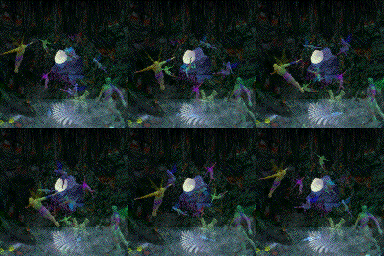
 To run the animation [if it's not], start here, then press your browser's
  above.
 To create a picture of an apple, for example, just type the word "apple" on your keyboard and let the computer do the rest.
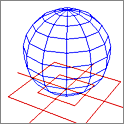
No wait, that's not right. The real first step is to tell the modeling program the size, boundaries, and position of the shapes you want. This is like sketching on a canvas before you begin to paint. For our example, I model the sphere and put a flat piece or plane beneath it.
The figure, the wings, and even the little feathers falling away in Ikaros
were all "sketched" first as shapes or groups of shapes.
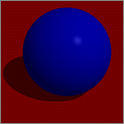 The program has the ability to shine light on the models and cast shadows like the lighting found in real life. Just like the sun, big lights far away cast different shadows than nearby light bulbs or little spot lights.
In Phase Three, you will tell the modeling program all these qualities of light for each surface in the picture. And you need to make judgments about which reflection is more important and which shadow is confusing to the senses.
Balancing Phase Two with Phase Three usually takes me the longest. The subtlety needed often outstrips the software available for handling it, so often times ingenuity must come to the rescue. For example, although there are many lights helping to define the dark buildings in Urbantine, they are carefully orchestrated to soften their effects. I feel successful when lighting decisions seem too natural to draw attention.
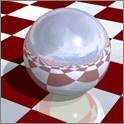 The basic shapes now get covered with surfaces. The surfaces can be as simple as the color red or more complex like a checkerboard. For the checkerboard I don't need to draw the whole thing, just four squares: two diagonal dark ones and two diagonal light. Then I can tell the program to repeat the pattern the length and width of the plane (like the pattern behind these words). For the sphere I have chosen a blue-grey. Then I have told the program to make light spread evenly over the color, pool into light bright spots to show that the color is smooth, lend color to the highlight as only metallic surfaces do, and reflect quite a bit of the environment.
Other kinds of surfaces do not show as colors on the model. These surfaces are more like textures and are made by painting a picture (also called a map) using just greys. A bump map, for instance, will seem to raise little hills where it is painted light and make little valleys where it is dark. I could create the surface of scratched wood (as in the image Hand to Hand ) by drawing them, to combine with the painting of the wood texture, and including this in the surface of my plane.
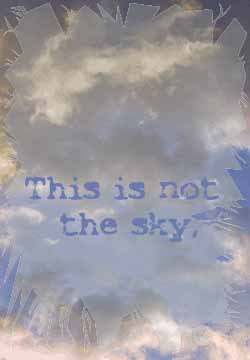 After you give the instructions to the program about the shapes, the surfaces, and the lights, you tell the program to make a final image. It will calculate all the information about the valleys and the velvet and the spheres and the reflections. This takes awhile, so it's a good time to do your laundry, have some lunch, go outside and see what the sky really looks like, and take a friend to the movies. Then come back to admire your work and wonder what would happen if you made just that one shape a little bit brighter right there.
 From the same set of instructions you can also make panoramas. When you view these, it's like sitting in the middle of the picture and looking all around. Or, you can move the shapes a little at a time, picture after picture and create movies, little animations that will run on the computer or over the web. Then you can add sound and learn about writing music and how to program your images into interactive games. It just goes on and on.
To run the animation [if it's not], start here, then press your browser's above.
Some other places you might like to look include:

 Microspot, which has a free, fully functional, limited version of 3D World available for download.
Vidi, which, as a parting beau geste, is offering its very good 3D program as a free download.
3D on a Budget, which showcases 3D shareware
Zutroy's Infini-D page, for links and models
George Chiang's Javascript Tutorial, a great site for fun and learning
Microspot, which has a free, fully functional, limited version of 3D World available for download.
Vidi, which, as a parting beau geste, is offering its very good 3D program as a free download.
3D on a Budget, which showcases 3D shareware
Zutroy's Infini-D page, for links and models
George Chiang's Javascript Tutorial, a great site for fun and learning
 To see the truthful lies of some uniquely talented artists you might consider Layne Karkruff's gemlike 3D icons done pixel by pixel [and sampled at right], Paul Hamilton's grunge-wonderful aesthetic, or the tech-nouveau style of Mind Killaz Graphix.
Beyond suggesting these, this is as simple a start to 3D as I can offer. I hope it helps. You can distribute these pictures and the text if you want just so long as no charge or change is made*. And you can write to me at Old Town if you like, with suggestions for more good sites or to ask questions. Meanwhile, just keep on keeping on.
Bonus Tutorial 01: Make 3D Chrome Type without a 3D Program
Bonus Tutorial 02: Take that 3D Chrome Type and Make It Grungy
What is Next Month's Tutorial? 
Would you like to look at images made with a 3D program?
Or immerse yourself in these collected deep thoughts on art.
How about a visit to the art in 3D-rendered Old Town.

*In all other regards this page and its pictures remain ©1998 artSavant.